
Download Messenger Genie – AI‑Powered Chrome Extension for Smart Messaging
Overview: Why Messenger Genie Is Changing Online Communication
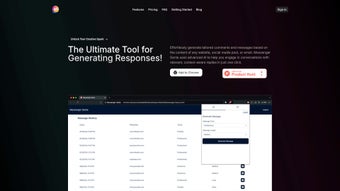
In today’s fast‑paced digital world, keeping up with comments, emails, and social‑media threads can feel overwhelming. Messenger Genie steps in as a sophisticated AI‑powered Chrome extension that turns the chore of replying into a seamless, context‑aware experience. By analyzing the content of the page you’re on—whether it’s a blog post, a Facebook thread, or an incoming email—Messenger Genie crafts relevant, well‑structured responses in real time.
The tool is built for professionals, marketers, and casual users alike, offering the flexibility to adjust tone, length, and even embed specific keywords so that every reply feels authentically yours. An auto‑save draft function protects unfinished thoughts, while the intuitive interface ensures you never lose a message. Whether you’re trying to boost engagement on a forum, streamline customer support emails, or simply keep up with a lively discussion, Messenger Genie provides a reliable, secure, and constantly updated solution that fits directly into your Chrome browser.
Its lightweight footprint means you won’t notice any slowdown, and because it runs locally in the browser, your data stays private. In short, Messenger Genie is more than a shortcut—it’s a communication ally that lets you focus on ideas while it handles the wording.
Core Features & Real‑World Benefits
- AI‑driven context analysis for accurate, on‑topic replies.
- Customizable tone options (formal, friendly, persuasive, etc.).
- Adjustable reply length—from concise one‑liners to detailed paragraphs.
- Keyword insertion to keep brand voice consistent.
- Auto‑save draft capability for later editing.
- One‑click insertion of generated messages into any web‑based text field.
- Secure, local processing—no cloud storage of your personal drafts.
- Frequent updates that incorporate the latest language models.
Pros
- Significant time savings when handling large volumes of messages.
- Highly accurate responses that respect the original context.
- Easy to switch tone and style without leaving the browser.
- Free basic version with optional premium upgrades for advanced models.
- Lightweight extension that does not impact Chrome performance.
Cons
- Currently limited to Chrome; no native support for Firefox or Safari.
- Advanced tone‑control features require a paid subscription.
- Relies on internet connection for AI model updates.
Installation, Usage & Compatibility Guide
Getting started with Messenger Genie is straightforward. First, visit the Chrome Web Store and search for “Messenger Genie.” Click Add to Chrome, confirm the permissions, and the extension icon will appear next to your address bar. The installation process takes less than a minute, and the extension automatically updates whenever a new AI model or security patch is released.
Once installed, click the Genie icon to open the configuration panel. Here you can set your preferred default tone, choose a default reply length, and add any brand‑specific keywords you want the AI to incorporate automatically. The panel also includes an Auto‑Save Drafts toggle, which you can enable to preserve partially generated messages for later editing.
Using Messenger Genie is as simple as selecting text on a webpage or opening an email compose window, then clicking the Genie button. The AI reads the surrounding content, generates a reply, and displays it in a pop‑up window. You can edit the suggestion, adjust tone or length with a single click, and then insert the final text directly into the input field. The extension works seamlessly across popular platforms such as Gmail, Outlook Web, Facebook, LinkedIn, Reddit, and most any site that uses a standard HTML textarea.
Compatibility – Messenger Genie is built for the Chrome browser on Windows 10/11, macOS Catalina and later, as well as Chrome OS. While the extension runs on the desktop version of Chrome, it also works on Chrome for Android tablets, allowing you to draft replies on the go. The extension does not support iOS Chrome due to platform restrictions, but a companion web app is planned for future releases.
Supported operating systems: Windows 10/11, macOS 10.15+, Chrome OS, Android (Chrome browser).
Frequently Asked Questions
Is Messenger Genie free to use?
Yes, the core features—including AI‑generated replies, tone customization, and auto‑save drafts—are available for free. A premium tier offers advanced language models, bulk‑reply automation, and priority support.
How does Messenger Genie protect my privacy?
All processing occurs locally in your browser. Drafts are stored only on your device unless you explicitly export them. No personal data is sent to external servers, ensuring a secure and private experience.
Can I use Messenger Genie on multiple computers?
Yes. Simply install the extension on each Chrome browser where you want to use it and sign in with the same Google account to sync your preferences.
What browsers are supported besides Chrome?
Currently only Google Chrome is officially supported. A beta version for Microsoft Edge (Chromium‑based) is under testing and will be released later this year.
How often does Messenger Genie receive updates?
Updates are rolled out monthly, with additional security patches released as needed. The extension automatically checks for new versions and prompts you to install them.
Conclusion & Call to Action
Messenger Genie offers a powerful blend of AI intelligence, user‑friendly customization, and robust privacy safeguards—all packaged in a lightweight Chrome extension. Whether you’re a social‑media manager aiming to boost engagement, a sales professional handling dozens of client emails daily, or simply someone who wants to keep up with online conversations without the stress, Messenger Genie delivers a reliable, secure, and time‑saving solution. The free tier provides ample functionality for most users, while the premium plan unlocks deeper AI capabilities for power users. Ready to transform the way you communicate online? Download Messenger Genie now and start generating smarter, more personalized replies instantly.



.png)



